How to Find Your Windows Product Key
By Robert MocaUpdated 6 min read
The short answer
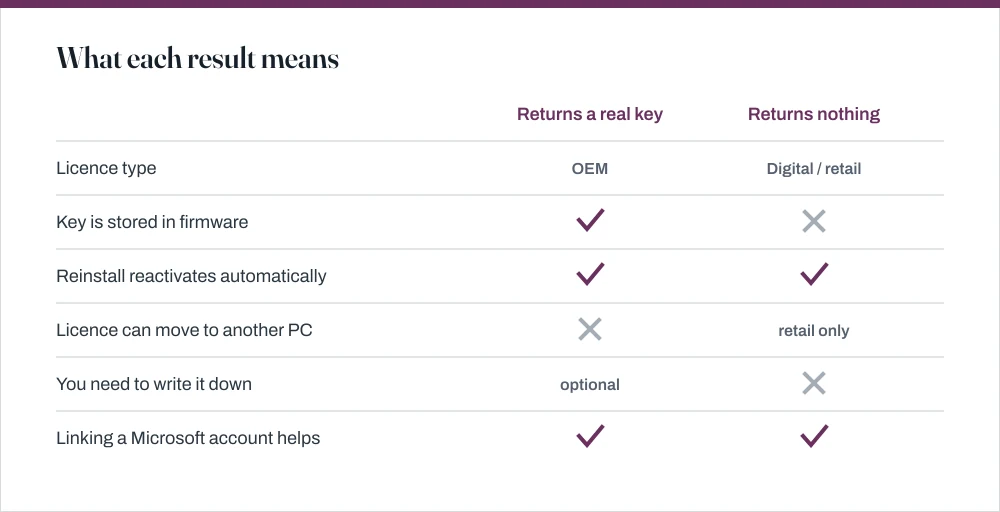
In PowerShell, run (Get-WmiObject -query 'select * from SoftwareLicensingService').OA3xOriginalProductKey. A firmware key comes back. On most modern PCs nothing does, because activation is a digital licence, not a key you hold.

Four things worth knowing
- Most machines since Windows 10 have no per-machine key to find; activation is a hardware hash held on Microsoft's servers.
- The OA3 query reads the key embedded in firmware by the manufacturer, which is the only genuine key on most retail PCs.
- A key beginning VK7JG or similar is a generic edition placeholder, not your licence.
- Link your digital licence to a Microsoft account before you change hardware; that is what makes reactivation possible afterwards.
This one almost always comes up just before a reinstall, and the answer is more reassuring than people expect: on a modern machine you probably do not need a key at all. Understanding why will save you a long search for something that was never there.
How activation actually works now
Since Windows 10, activation is normally a digital licence. When Windows activates, it builds a hash from your hardware, mostly the motherboard, and registers that hash with Microsoft's activation servers. Reinstall on the same hardware and Windows simply recognises the machine and activates itself, without you typing a key at any point.
There are three ways a machine ends up licensed, and they behave differently.
| Type | Where the key lives | Survives a hardware change? |
|---|---|---|
| OEM, preinstalled | Embedded in the firmware (OA3) | No. Tied to that motherboard |
| Retail, bought separately | The card or email you received | Yes, can be moved to another PC |
| Free upgrade from 7 or 8 | Nowhere. Digital licence only | No, unless linked to an account |
Reading the key that is there
Read the firmware-embedded key
Open PowerShell. Press Win + X, then I on Windows 11 or A on Windows 10.
See opening a terminal in Windows for the other routes.
Run
(Get-WmiObject -query 'select * from SoftwareLicensingService').OA3xOriginalProductKeyThis reads the OA3 key the manufacturer wrote into the firmware at the factory.
A blank result means no key is embedded, which is normal and not a fault.
Self-built machines, retail licences and free upgrades all return nothing here.
The older equivalent is wmic path softwarelicensingservice get OA3xOriginalProductKey in Command Prompt. It returns the same value, though wmic is deprecated on current builds and may not be present.
Why the key looks the same as everyone else's
You may run a tool and get a key like VK7JG-NPHTM-C97JM-9MPGT-3V66T. Search for it and you will find thousands of other people with precisely the same one, which is unnerving until you know why. It is a generic edition key, published by Microsoft purely to select which edition to install, and it carries no licence whatsoever. The tool is not lying to you; that really is what is stored there.
Tools that read the DigitalProductId registry value return this on machines with a digital licence, because that is genuinely what is stored there. The tool is not lying; the value is simply not your licence. The OA3 query above is the one that reads a real key when a real key exists.
Linking the licence to a Microsoft account
If you do one thing from this page, do this one, and do it today rather than on the evening you need it. Linking the licence is what makes reactivation possible after a hardware change. Without it, a digital licence is tied to a motherboard and nothing else, and once that motherboard is gone the link cannot be made retrospectively.
Link a digital licence
Open Settings → System → Activation.
If it says the licence is not linked, sign in with a Microsoft account.
You can go back to using a local account afterwards; the link persists.
Confirm it now reads *Windows is activated with a digital licence linked to your Microsoft account*.
After a motherboard change, use Troubleshoot on the same Activation page and choose *I changed hardware on this device recently*.
You sign in, pick the device from the list, and Windows reactivates. This is the supported path, and it only works if the link was made first.
Other places a key may be
- A sticker on the machine. Common up to Windows 7, rare afterwards. Laptops often had it in the battery compartment.
- The retail box or confirmation email, if you bought Windows separately.
- Your Microsoft account order history at account.microsoft.com, for a digital purchase.
- Your workplace IT department, for a volume-licensed machine. There is no per-machine key to find on those.
What running unactivated actually costs
Less than people expect, which is genuinely worth knowing if you are between licences and slightly panicking. Windows keeps working. It keeps getting security updates. It deletes nothing. What you get is a watermark in the corner, a nag in Settings, and the Personalization page locked, so you cannot change wallpaper, colours or themes from there.
That last one has a documented way around it that requires no licence trickery: right-click any image and choose Set as desktop background, as covered in the guide on changing your desktop wallpaper.
Common questions
Why does my product key look the same as everyone else's?
Because it is a generic edition key rather than your licence. On a machine with a digital licence, the value stored in the registry is a published placeholder used to select which edition to install. The real entitlement is a hardware hash held by Microsoft's activation servers, so there is no unique key to recover.
Do I need my product key to reinstall Windows?
Usually not. If Settings → System → Activation reports a digital licence, reinstalling the same edition on the same hardware reactivates automatically. You can skip the key prompt during setup by choosing I don't have a product key.
Can I move my Windows licence to a new PC?
Only a retail licence. OEM licences, which is what preinstalled Windows uses, are tied to the motherboard they shipped with and cannot be transferred. A licence obtained through the free upgrade from Windows 7 or 8 behaves the same way.
What happens if I do not activate Windows?
Windows keeps working and keeps receiving security updates. You get a watermark in the corner of the screen, periodic prompts, and the Personalization settings are locked so you cannot change wallpaper or colours from there. Nothing is deleted and no features stop working beyond that.
Sources
Each source is listed with the specific claim it supports.
Find your Windows product key — Microsoft Support
Supports: Where product keys are located by licence type, and that a digital licence requires no key.
Windows subscription activation — Microsoft Learn
Supports: How digital licences and account linking work, and the role of the activation servers.
Windows version search — Microsoft Learn
Supports: Using winver and related tools to confirm the installed edition and build before a reinstall.