How to Open the Terminal in Windows
By Robert MocaUpdated 6 min read
The short answer
Press Win + R, type cmd and press Enter, or Win + X then I for Windows Terminal on Windows 11. For admin rights use Win + X then A. Typing cmd in File Explorer's address bar opens a prompt in that folder.

Four things worth knowing
- Command Prompt, PowerShell, Windows Terminal and WSL are four different things: two shells, one window that hosts them, and a Linux environment.
- Win + X is the fastest route to an administrator prompt, and the letter after it differs between Windows 10 and 11.
- Typing cmd or powershell into File Explorer's address bar opens a shell already in that directory, which saves a lot of cd typing.
- You do not need administrator rights for most things, and running elevated by default removes a useful safety net.
"Open the terminal" is one of those instructions that quietly assumes you already know which terminal is meant. On macOS and Linux there is essentially one, so nobody has to say. On Windows there are four different things people mean by it, and following an instruction with the wrong one produces errors that make no sense at all, which is how you end up convinced you have broken something.
The four things people mean
| What it is | Use it when | |
|---|---|---|
Command Prompt (cmd) | The old shell, inherited from DOS | Following older instructions, or running a tool that parses its output |
| PowerShell | A modern object-based shell | Anything new: it is more capable and accepts most familiar commands |
| Windows Terminal | A window that hosts any of the others in tabs | You want tabs, panes and a decent font |
| WSL | A real Linux environment running alongside Windows | You need genuine Linux tools — bash, grep, ssh, package managers |
The distinction that matters most: Windows Terminal is not a shell. It is a window. Inside it you choose which shell to run, and by default that is PowerShell. If an instruction says "open Windows Terminal and run this", check whether the command is a PowerShell command or a Command Prompt one: they are not interchangeable.
Every way to open one
The routes worth remembering
Win + R, then
cmdorpowershell, then Enter.Works identically on every version of Windows since XP. Press Ctrl + Shift + Enter instead of Enter to open it elevated.
Win + X, then a letter.
On Windows 11: I for Terminal, A for Terminal (Admin). On Windows 10: C for Command Prompt, A for Command Prompt (Admin). The menu also has Device Manager, Disk Management and Event Viewer.
Start menu search.
Press the Windows key, type
terminal,cmdorpowershell, then Ctrl + Shift + Enter to launch the highlighted result as administrator.From File Explorer's address bar.
Open the folder you want, click the address bar, type
cmdand press Enter. The shell opens with that folder as its working directory.Right-click inside a folder.
On Windows 11, Open in Terminal. On Windows 10, hold Shift while right-clicking for Open PowerShell window here.
Running as administrator, and when you actually need to
An elevated prompt is simply one running with administrator privileges. The reliable way to check is the title bar: it says Administrator: at the front. If it does not, you are not elevated, whatever you clicked to get there.
You need it for changes affecting the whole system: starting or stopping services, writing to C:\Windows or C:\Program Files, ending processes belonging to another user, and most netsh, sfc, chkdsk and dism operations. You do not need it for looking at things — ipconfig, ping, tasklist, dir and navigating your own files all work fine unelevated.
WSL, when you need real Linux
The Windows Subsystem for Linux runs a genuine Linux distribution alongside Windows, and it is far better than it has any right to be. WSL 2 uses a real Linux kernel in a lightweight managed virtual machine: it starts in about a second, it shares your filesystem, and it needs no separate window.
Install and open WSL
Open an administrator terminal and run
wsl --install.This enables the required Windows features and installs Ubuntu by default.
wsl --list --onlineshows the other distributions available.Restart when prompted.
The virtual machine platform feature needs a reboot before it becomes available.
Set a Linux username and password when the distribution first starts.
These are unrelated to your Windows account, and the password is what
sudowill ask for.Afterwards, open it by typing
wslin any shell, or pick the distribution from Windows Terminal's tab dropdown.
WSL is what you want if you are trying to run a shell script written for Linux. The guide on running a .sh file on Windows compares WSL with Git Bash and Cygwin, and covers the line-ending problem that breaks scripts edited in Windows text editors.
The commands worth knowing on day one
| Task | Command Prompt | PowerShell |
|---|---|---|
| List files | dir | Get-ChildItem (alias dir, ls) |
| Change folder | cd foldername | same |
| Up one level | cd .. | same |
| Clear the screen | cls | Clear-Host (alias cls) |
| Show IP configuration | ipconfig /all | Get-NetIPConfiguration |
| List processes | tasklist | Get-Process |
| End a process | taskkill /F /PID 123 | Stop-Process -Id 123 -Force |
| Copy a file | copy a.txt b.txt | Copy-Item a.txt b.txt |
PowerShell keeps aliases for most of the familiar names, so dir, cls and cd all work. That is why instructions written for Command Prompt often run unchanged in PowerShell — until they hit something like output redirection or a batch-file construct, which behave differently.
Two things people actually come here to do
The two things that most often send people looking for a shell in the first place are killing something that will not close, and finding what is squatting on a port. Both have their own guides: force quitting an app covers taskkill and the cases where it does not work, and killing a process using a port covers tracing a listener back to the program holding it.
Common questions
What is the difference between Command Prompt and PowerShell?
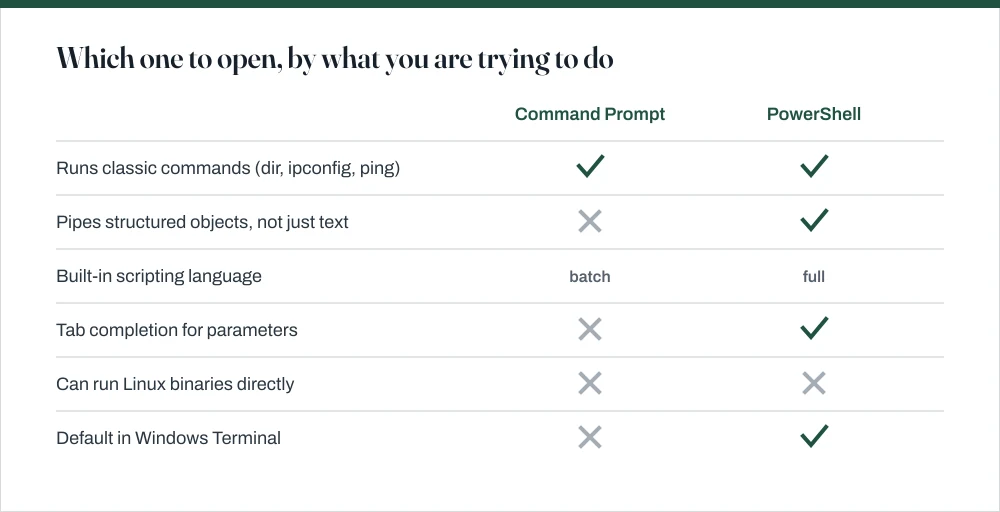
Command Prompt is the older shell and passes plain text between commands. PowerShell passes structured objects, has a full scripting language, and offers tab completion for command parameters. PowerShell keeps aliases like dir and cd, so most familiar commands still work. Use PowerShell unless you are following instructions written specifically for Command Prompt.
How do I open a command prompt as administrator?
Press Win + X then A. Alternatively, press Win + R, type cmd, and press Ctrl + Shift + Enter rather than Enter. You can confirm it worked by checking that the window title begins with Administrator:.
How do I open a terminal in a specific folder?
Open the folder in File Explorer, click the address bar, type cmd or powershell, and press Enter — the shell opens with that folder as its working directory. On Windows 11 you can also right-click inside the folder and choose Open in Terminal; on Windows 10, Shift + right-click gives Open PowerShell window here.
Is Windows Terminal the same as Command Prompt?
No. Windows Terminal is a window that hosts shells in tabs; Command Prompt is one of the shells it can host. Opening Windows Terminal gives you PowerShell by default, not Command Prompt, which matters when you are following instructions that assume one or the other.
Sources
Each source is listed with the specific claim it supports.
What is Windows Terminal? — Microsoft Learn
Supports: That Windows Terminal is a host application for multiple shells rather than a shell itself, and that it defaults to PowerShell.
What is PowerShell? — Microsoft Learn
Supports: That PowerShell passes objects rather than text and includes a full scripting language, and the cmdlet names given in the comparison table.
Install WSL — Microsoft Learn
Supports: The `wsl --install` command, the requirement for an administrator prompt and a restart, and that Ubuntu is the default distribution.