How to Run a Shell Script (.sh) on Windows
By Robert MocaUpdated 6 min read
The short answer
Run wsl --install in an administrator terminal, restart, then run bash script.sh inside WSL. For something lighter, right-click the folder and choose Git Bash Here. Command Prompt and PowerShell cannot run .sh files directly.

Four things worth knowing
- A .sh file is a Unix shell script; Windows has no native interpreter for it, so you need WSL, Git Bash or Cygwin.
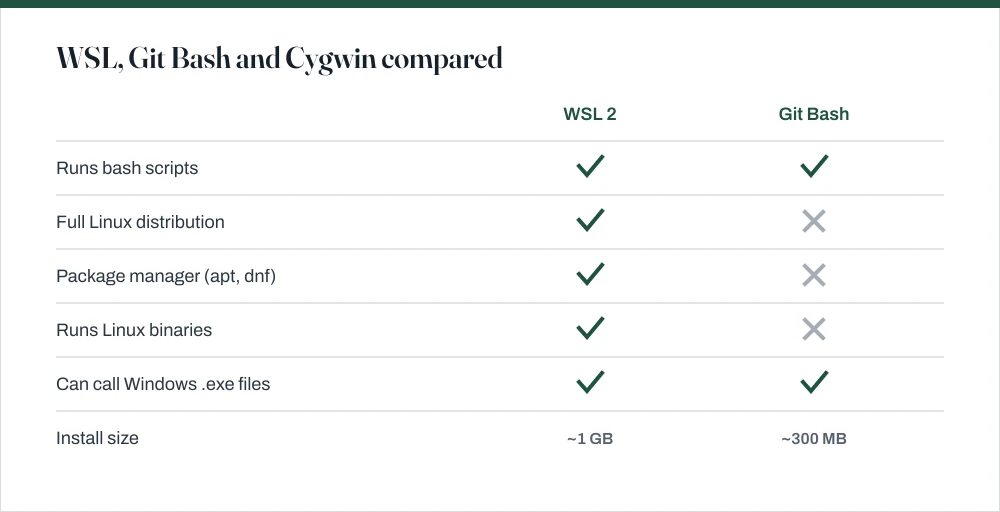
- WSL 2 runs a real Linux kernel and is the right choice when the script installs packages or expects a full Linux system.
- Git Bash is enough for simple scripts and is already installed on most developer machines.
$'\r': command not foundmeans Windows line endings — convert with dos2unix or set your editor to LF.
A .sh file is a script written for a Unix shell, normally bash. Windows has no interpreter for it built in, so double-clicking does nothing useful and running it from Command Prompt gives you a syntax error that looks alarming but simply means Windows has no idea what it is reading. What you need is something providing a bash environment, and there are three realistic options with genuinely different trade-offs.
WSL: the complete answer
The Windows Subsystem for Linux runs a real Linux distribution alongside Windows, and it is remarkably good. WSL 2 uses an actual Linux kernel in a lightweight managed virtual machine: it starts in about a second and needs no separate window. If your script does anything beyond shuffling files about, this is the option you want.
Install WSL and run a script
Open an administrator terminal — Win + X, then A.
See opening a terminal in Windows for the alternatives.
Run
wsl --installand let it finish.This enables the required Windows features and installs Ubuntu.
wsl --list --onlineshows the other distributions available.Restart when prompted.
The virtual machine platform needs a reboot. The installation completes on next boot.
Set a Linux username and password when the distribution first starts.
Unrelated to your Windows account. The password is what
sudoasks for.Navigate to your script and run it:
cd /mnt/c/Users/you/scriptsthenbash setup.sh.Your Windows drives are mounted under
/mnt, so C: is/mnt/c.
Git Bash: probably already installed
Git for Windows quietly bundles a minimal bash environment along with the core Unix utilities: ls, grep, sed, awk, curl, ssh. For a script that copies files, runs a build tool or calls an API, that is entirely enough, it starts instantly, and there is a decent chance you already have it installed without realising.
- Install Git for Windows from git-scm.com if you do not already have it.
- Right-click the folder containing the script and choose Git Bash Here — on Windows 11 you may need Show more options first.
- Run
bash script.sh, or./script.shif the script has a shebang line. - Windows paths work with forward slashes:
/c/Users/you/scriptsisC:\Users\you\scripts.
Where Git Bash falls short is anything requiring a package manager or a real Linux binary. A script starting with apt-get install will fail, and no amount of configuration will change that: it is not a Linux system, it is a set of Unix tools compiled for Windows.
The line-ending error, which you will hit eventually
This is far and away the most common problem with .sh files on Windows, and the error message does absolutely nothing to explain itself, which is why it wastes so much of people's time:
$'\r': command not foundsyntax error near unexpected token $'{\r''/bin/bash^M: bad interpreter: No such file or directory
All three mean the same thing. Windows ends lines with carriage return plus line feed (\r\n); Unix uses line feed alone (\n). Bash reads the stray carriage return as part of the command, so bash\r is not an interpreter it recognises and every line ends with an invisible extra character.
Fix Windows line endings in a script
In WSL, install and run the converter:
sudo apt install dos2unixthendos2unix script.sh.It reports how many lines it converted, which confirms the diagnosis.
Without dos2unix, use sed:
sed -i 's/\r$//' script.sh.Works in Git Bash too, where dos2unix may not be available.
Set your editor to use LF. In VS Code, click CRLF in the status bar and choose LF.
This prevents the problem recurring the next time you edit the file.
If Git is converting them, set
git config --global core.autocrlf input.Git for Windows defaults to
true, which rewrites LF to CRLF on checkout — a frequent and invisible source of this error.
Other errors worth recognising
| Error | Cause | Fix |
|---|---|---|
'.' is not recognized... | Running it in Command Prompt | Use WSL or Git Bash |
Permission denied | Script is not marked executable | chmod +x script.sh, or run bash script.sh |
bad interpreter: ^M | Windows line endings | dos2unix script.sh |
command not found for apt | Git Bash is not a Linux distro | Use WSL |
No such file or directory on a real path | Windows path used in WSL | Use /mnt/c/... not C:\... |
| Script runs but does nothing | Missing shebang line | Add #!/bin/bash as line 1 |
Should you convert it to PowerShell instead?
Sometimes, and it is a question worth actually asking rather than assuming. If the script is short, moves some files around and calls a couple of tools, rewriting it in PowerShell removes the whole dependency and runs natively. No WSL, no Git Bash, nothing to install on the next machine you touch.
If the script is long, calls Linux-specific utilities, or came from somewhere you will need to update it from, translate nothing and use WSL. Maintaining a divergent Windows port of someone else's script is a worse job than installing WSL once.
If a script leaves something running and holding a port after it exits, the guide on killing a process using a port covers tracing and ending it. For a script that hangs entirely, force quitting covers the escalation order.
Common questions
Can I run a .sh file in Command Prompt?
No. Command Prompt and PowerShell have no bash interpreter, so a .sh file produces a syntax error rather than running. You need WSL, Git Bash or Cygwin. WSL is the most complete option and installs with a single command.
What does $'\r': command not found mean?
The script has Windows line endings (CRLF) where bash expects Unix ones (LF). The carriage return is being read as part of each command. Fix it with dos2unix script.sh, or sed -i 's/\r$//' script.sh. If it keeps recurring, Git's autocrlf setting is rewriting the file on checkout.
Is Git Bash enough, or do I need WSL?
Git Bash is enough for scripts that manipulate files, run build tools or call APIs. You need WSL for anything that uses a package manager, runs Linux binaries, or expects a real Linux filesystem: a script starting with apt-get install will never work in Git Bash.
How do I access my Windows files from WSL?
Your drives are mounted under /mnt, so C:\Users\you\Documents is /mnt/c/Users/you/Documents. Note that working across that boundary is slow; for active projects keep the files inside the Linux filesystem and reach them from Windows at \\wsl$\Ubuntu\home\you.
Sources
Each source is listed with the specific claim it supports.
Install WSL — Microsoft Learn
Supports: The `wsl --install` command, the administrator and restart requirements, and that Ubuntu is the default distribution.
Working across Windows and Linux file systems — Microsoft Learn
Supports: That Windows drives are mounted under /mnt, that \\wsl$ reaches Linux files from Windows, and that cross-filesystem work carries a performance penalty.
Git for Windows downloads — Git project
Supports: That Git for Windows bundles a bash environment and Unix utilities, and provides the Git Bash Here context-menu entry.