How to Kill a Process Using a Port in Windows
By Robert MocaUpdated 6 min read
The short answer
Run netstat -ano | findstr :3000 to find the process ID holding the port — it is the last number on the line. Then run taskkill /F /PID 1234. In PowerShell, Stop-Process -Id (Get-NetTCPConnection -LocalPort 3000).OwningProcess -Force.

Four things worth knowing
- netstat's -o switch is the important one: without it you see the port but not which process owns it.
- The PID is the last column, and it is what taskkill needs, not the port number.
- "Address already in use" after a crashed dev server is usually an orphaned child process, not the terminal you closed.
- A port below 1024, or one held by a system process, needs an elevated prompt to release.
You start a development server and it refuses to come up: EADDRINUSE: address already in use :::3000. Something is sitting on the port. Nine times out of ten it is a previous run of the very same thing that never shut down properly, because closing a terminal window kills the shell but a detached child process carries on listening quite happily without it.
The fix is two commands: find the owner, then end it.
Step one: find what is holding the port
Identify the process using a port
Open Command Prompt.
Win + R,
cmd, Enter. Elevation is not needed to look, only to kill something you do not own; see opening a terminal in Windows.Run
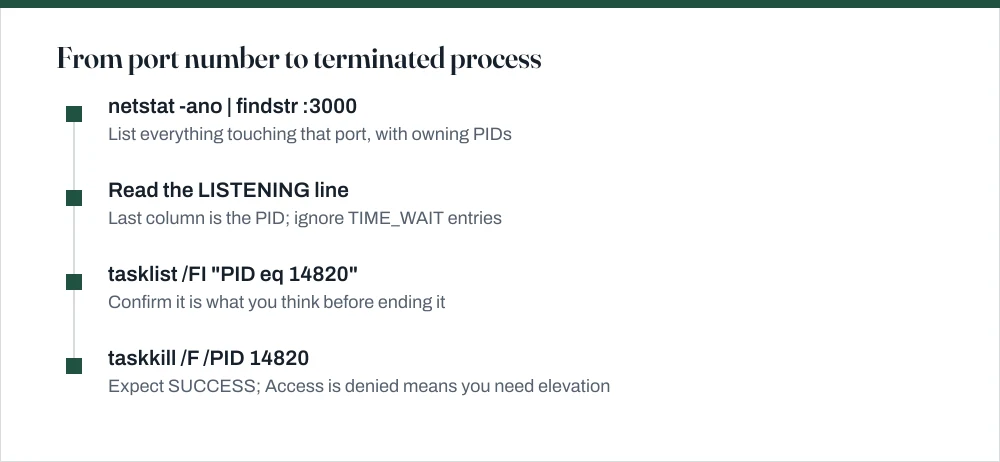
netstat -ano | findstr :3000, substituting your port number.-ashows all connections,-nshows numeric addresses rather than resolving names,-oadds the owning process ID. The-ois the one that matters.Read the last number on each line. That is the PID.
Look for the line whose state is LISTENING — that is the server holding the port. Lines in TIME_WAIT are closed connections lingering and will clear on their own.
Optionally, confirm what it is:
tasklist /FI "PID eq 1234".Worth doing before you kill it. A port you assumed was your dev server is occasionally something else entirely.
| Column | Example | What it means |
|---|---|---|
| Proto | TCP | Protocol — TCP or UDP |
| Local Address | 0.0.0.0:3000 | The port being held; 0.0.0.0 means all interfaces |
| Foreign Address | 0.0.0.0:0 | The remote end; zeros mean nothing is connected |
| State | LISTENING | LISTENING is the server. TIME_WAIT clears itself |
| PID | 14820 | The number taskkill needs |
Step two: end it
Run taskkill /F /PID 14820, substituting the number you just found. The /F forces it; without that flag, a process that is ignoring the polite request will carry on ignoring you.
You should see SUCCESS: The process with PID 14820 has been terminated. If you get Access is denied, reopen the prompt as administrator. If you get The process ... not found, it has already exited and the port is free.
The PowerShell one-liner
If you are in PowerShell there is a purpose-built cmdlet that collapses the whole thing into one line, and it is the version worth memorising:
Get-NetTCPConnection -LocalPort 3000— shows the connection with an OwningProcess column.Get-Process -Id (Get-NetTCPConnection -LocalPort 3000).OwningProcess— names the process before you kill it.Stop-Process -Id (Get-NetTCPConnection -LocalPort 3000).OwningProcess -Force— finds and ends it in one line.
If the port is genuinely free, Get-NetTCPConnection throws a "No matching MSFT_NetTCPConnection objects found" error rather than returning nothing. That is a confusing way to say the port is available, but it is what it means.
Ports that come up repeatedly
| Port | Usually | Note |
|---|---|---|
| 3000 | Node, React, Rails dev servers | The classic orphaned-process case |
| 8080 | Tomcat, proxies, alternative HTTP | Often a Java process that outlived its IDE |
| 5432 | PostgreSQL | A running service — stop the service, do not kill it |
| 3306 | MySQL / MariaDB | As above |
| 80 / 443 | IIS, or the World Wide Web Publishing Service | Needs elevation; stopping the service is cleaner |
| 5000 | Flask, ASP.NET, and macOS AirPlay habits | On Windows, usually a dev server |
When the port will not free up
- The line says TIME_WAIT, not LISTENING. Nothing is holding the port; the operating system is waiting out the TCP close sequence. It clears in under a couple of minutes on its own. There is no process to kill.
- taskkill reports success but the port stays busy. The process is stuck in a kernel-mode wait and cannot finish exiting. The force quit guide covers why, and why only a restart resolves it.
- Hyper-V has reserved the port range. Run
netsh interface ipv4 show excludedportrange protocol=tcp. If your port falls inside an excluded range, nothing is using it — Windows has reserved it, and you need to restart with Hyper-V's dynamic port range adjusted or pick another port. - Nothing appears in netstat at all. Check you are looking at the right protocol.
netstat -anocovers TCP and UDP, but a UDP listener shows no state column, so it is easy to skim past.
The opposite problem: opening a port
Different symptom, different cause, and worth separating. If your service is running fine but nothing can reach it from another machine, the port is not being held by anything, it is being blocked. Windows Defender Firewall blocks inbound connections by default, and the right fix is an inbound rule for that one port, not switching the firewall off.
From an elevated prompt: netsh advfirewall firewall add rule name="Dev server 3000" dir=in action=allow protocol=TCP localport=3000. The guide on turning off the Windows firewall covers why adding a rule is a better answer than disabling the whole thing, and how to undo either.
Common questions
How do I find what is using a port in Windows?
Run netstat -ano | findstr :3000 in Command Prompt, substituting your port. The last number on each line is the process ID. Look for the line whose state is LISTENING: that is the process holding the port. Confirm what it is with tasklist /FI "PID eq 1234" before ending it.
Why does the port stay in use after I close the program?
Either a detached child process is still listening — closing a terminal kills the shell but not everything it started, or the connection is in TIME_WAIT, which is the operating system waiting out the TCP close sequence rather than anything holding the port. TIME_WAIT clears itself within a couple of minutes.
Do I need administrator rights to kill a process on a port?
Not to look — netstat runs fine unelevated. You need elevation to end a process owned by another user or by the system, and to work with ports below 1024. If taskkill returns Access is denied, reopen the prompt with Win + X then A.
What is the PowerShell equivalent of netstat -ano?
Get-NetTCPConnection -LocalPort 3000, which returns an OwningProcess property. To find and end the process in one line: Stop-Process -Id (Get-NetTCPConnection -LocalPort 3000).OwningProcess -Force. Note that it raises an error rather than returning nothing when the port is free.
Sources
Each source is listed with the specific claim it supports.
netstat — Windows commands reference — Microsoft Learn
Supports: The meaning of the -a, -n and -o switches and the columns in the output, including the owning process ID.
taskkill — Windows commands reference — Microsoft Learn
Supports: The /F and /PID switches and the exact success and access-denied messages.
tasklist — Windows commands reference — Microsoft Learn
Supports: The /FI filter syntax used to confirm a process name from its PID.