How to Open .aae, .msg and .json Files on Windows
By Robert MocaUpdated 8 min read
The short answer
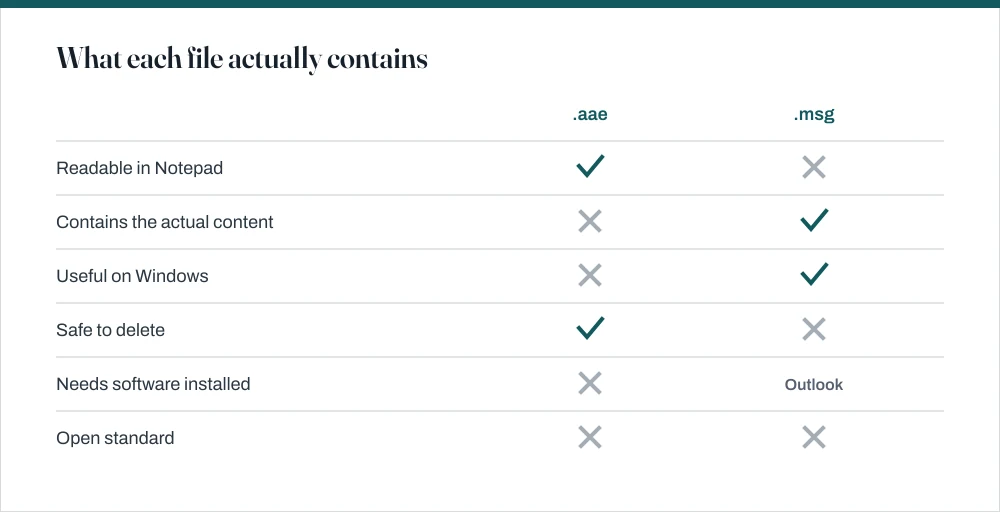
An .aae is an iPhone edit sidecar with no image in it, so it cannot be opened and is safe to delete. A .msg is an Outlook email. A .json is plain text — open it in Notepad, or in a browser for a collapsible view.

Four things worth knowing
- None of these three needs paid software, and two of them need nothing installed at all.
- .aae files hold edit instructions, not pixels; deleting one reverts the photo to its original, and never deletes the photo itself.
- .msg is a proprietary Outlook format; .eml is the open equivalent that any mail client can read.
- If Windows says a file has no associated app, the fix is the Open with dialog rather than a download from a search result.
These three land in your folders constantly, for completely unrelated reasons: .aae after pulling photos off an iPhone, .msg when somebody forwards you an email as an attachment, and .json when you export settings from more or less anything. They have nothing in common except that Windows shows all three as a blank page icon and offers you no way in.
.aae files, and why they cannot be opened
When you edit a photo on an iPhone, iOS never touches the original. It keeps the untouched image and writes your changes into a separate little sidecar file with the same name and an .aae extension. So IMG_4471.HEIC picks up a companion IMG_4471.aae holding the crop, the exposure change and whatever filter you used.
That file is an Apple property list, which is XML. It contains no pixels whatsoever. There is no image inside it to open, which is why every attempt to open one as a picture fails, and why the tools advertised as .aae viewers cannot do what they claim.
Look inside an .aae file
Right-click the file and choose Open with → Notepad.
Use Choose another app if Notepad is not offered, then untick *Always use this app*.
You will see XML: keys such as
adjustmentBaseVersionand a longadjustmentDatablock.The adjustment data is Base64-encoded, so it is not meant to be read by a person even once decoded.
Confirm there is no image reference anywhere in the file.
This is the useful part of the exercise. It settles the question of whether anything is recoverable from it.
To remove them in bulk, open the folder, type *.aae into the search box, wait for the results, press Ctrl + A and then Delete. The guide on selecting multiple files covers the selection shortcuts if the results run to thousands.
To avoid creating them in the first place, set the iPhone to hand over compatible files: Settings → Photos → Transfer to Mac or PC → Automatically. That converts on export and leaves the sidecars behind. The guide on connecting an iPhone to a Windows laptop covers the transfer itself.
.msg files, which are emails
A .msg file is one email saved out of Microsoft Outlook, carrying the sender, recipients, subject, body, formatting and every attachment in a single file. Unlike .aae, this one really does contain the thing you want, which makes it more frustrating rather than less. The problem is that the format is proprietary and binary, so opening it in Notepad gives you pages of gibberish with the occasional recognisable word floating past.
| Method | Needs installing? | Notes |
|---|---|---|
| Outlook, desktop | Yes, if absent | Double-click and it opens as a normal email |
Rename to .eml | No | Works inconsistently; the formats are not equivalent |
| Ask the sender to resend | No | The most reliable fix, and usually the fastest |
| Windows Mail | No, but limited | Does not open .msg; opens .eml |
| A third-party viewer | Yes | Choose carefully; see the caution below |
If Outlook is installed, there is no problem: double-clicking opens the message. If it is not, the honest answer is that the format was designed around Outlook, and the alternatives are all compromises.
The rename-to-.eml trick is worth understanding rather than trusting. .eml is the open MIME format used by nearly every other mail client; .msg is a compound binary document. Renaming changes only the extension, not the contents, so it works when the message is simple and fails on anything with rich formatting or attachments. Try it, and do not be surprised when it does not work.
.json files, which are just text
Good news on this one: JSON is plain text. It is used for configuration files, exported settings and API responses, there is nothing proprietary about it, and there is nothing to install. Any text editor opens it, and unlike the other two it was actually designed to be read by a person.
- Notepad. Right-click, Open with → Notepad. Fine for a small file; a large one arrives as a single unbroken line.
- A browser. Drag the file onto a Chrome, Edge or Firefox window. All three render JSON as a collapsible tree, which is far easier to read than raw text.
- Notepad++ or VS Code. Both fold sections, colour the syntax and flag a mistake in the structure. Worth having if you meet JSON regularly.
- PowerShell.
Get-Content file.json | ConvertFrom-Jsonparses it into an object you can inspect, and errors immediately if the file is malformed.
One warning that matters more than the formatting: JSON files exported from applications routinely contain access tokens, API keys and session cookies in plain text. Before pasting the contents into an online JSON viewer or formatter, read what is in it. Those services receive whatever you paste. Use a local editor for anything that came out of an account you care about.
When Windows says there is no app for this file
This message only ever means that no default program is registered for that extension. It is not telling you the file is broken, and it is not telling you that you lack something capable of opening it. Nine times out of ten you already have the right program installed.
Set what opens a file type
Right-click the file and choose Open with → Choose another app.
Pick an app from the list, or scroll down and choose Look for another app on this PC.
For a text-based file such as .json or .aae, Notepad is always present and always works.
Tick Always use this app to open .xyz files only if you are sure.
Leave it unticked while experimenting, otherwise you have to undo the association afterwards.
To change it later, open Settings → Apps → Default apps and search for the extension.
This page lets you set defaults per file type rather than per application, which is the view you usually want.
Common questions
Can I delete .aae files?
On Windows, yes. They contain edit instructions rather than image data, so deleting one never touches the photograph itself and frees the folder of clutter. The only consideration is that if you later copy the photos back to an iPhone, the edits will be gone and you will get the original unedited version.
How do I open a .msg file without Outlook?
There is no reliable free route built into Windows, because the format was designed around Outlook. Renaming the file to .eml sometimes works for simple messages and usually fails on anything with attachments or rich formatting. The most dependable fix is to ask the sender to forward the message normally or resend it as .eml, which every mail client can read.
What program opens a .json file?
Any text editor, because JSON is plain text. Notepad works on every Windows machine. For a much more readable view, drag the file onto a browser window: Chrome, Edge and Firefox all display JSON as a collapsible tree with search.
Why does Windows say there is no app associated with this file?
It means no default program is registered for that extension, not that the file is broken. Right-click it, choose Open with → Choose another app, and pick something suitable. For text-based formats, Notepad is always available and always works.
Sources
Each source is listed with the specific claim it supports.
Change default programs in Windows — Microsoft Support
Supports: The Open with dialog and the Settings → Apps → Default apps route for setting file associations by extension.
About the MS-OXMSG file format — Microsoft Learn
Supports: That .msg is a compound binary document defined by Microsoft, rather than the MIME-based .eml format used by other mail clients.
Import photos and videos from an iPhone — Microsoft Support
Supports: The photo transfer process from an iPhone to Windows during which .aae sidecar files are copied across.